Employee Appraisal Form Template

Free Word download β€’ Edit online β€’ Save & share with Drive β€’ Export to PDF

2 pagesβ€’20–25 min to fillβ€’Difficulty: Standard
Learn more ↓
FreeEmployee Appraisal Form Template

At a glance

What it is
An Employee Appraisal Form is a structured document managers use to evaluate an employee's performance against agreed goals, core competencies, and workplace behaviors over a defined review period. This free Word download gives you an editable, ready-to-use form capturing self-assessment, manager ratings, development needs, and next-period objectives in one place.
When you need it
Use it for annual, semi-annual, or quarterly performance reviews, or whenever a manager needs a documented record of an employee's progress, strengths, and areas for improvement.
What's inside
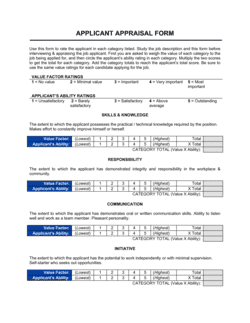
Employee and review period details, goal achievement ratings, competency scores, self-assessment section, manager comments, development plan, next-period objectives, and signature acknowledgment blocks for both parties.

What is an Employee Appraisal Form?

An Employee Appraisal Form is a structured document managers use to formally evaluate an employee's performance against pre-agreed goals, core competencies, and workplace behaviors over a defined review period. It captures both the employee's self-assessment and the manager's independent ratings, development plan, and next-period objectives in one consolidated record. Rather than relying on memory or informal conversation, the form creates a documented, consistent basis for compensation decisions, promotion discussions, and performance improvement actions.

Why You Need This Document

Without a standardized appraisal form, performance reviews default to inconsistent, undocumented conversations that are impossible to defend when an employee disputes a rating, a pay decision, or a dismissal. Managers reviewing the same role apply different criteria, scores drift toward the middle to avoid conflict, and development commitments made verbally are forgotten within weeks. A completed appraisal form gives HR a defensible paper trail, gives employees a clear record of expectations and feedback, and gives managers the structure they need to deliver fair, specific evaluations every time β€” regardless of their experience level. This template eliminates the blank-page problem and gets every review on a consistent, professionally structured footing from the first use.

Which variant fits your situation?

If your situation is…Use this template
Reviewing a new hire at the end of their probationary periodProbationary Period Review Form
Evaluating a manager or team leader's leadership performanceManager Performance Review Form
Gathering peer feedback as part of a 360-degree review process360-Degree Feedback Form
Documenting a performance improvement plan after a poor reviewPerformance Improvement Plan
Conducting a quick check-in rather than a full annual reviewEmployee Check-In Form
Setting and tracking individual goals outside of a review cycleEmployee Goal-Setting Form
Reviewing employee performance for a promotion decisionPromotion Recommendation Form

Common mistakes to avoid

❌ Rating everyone in the middle of the scale

Why it matters: Compressed scores eliminate meaningful differentiation, making it impossible to justify promotion decisions, compensation changes, or performance improvement actions.

Fix: Calibrate ratings across your team before finalizing forms. If every employee is a 3 out of 5, revisit the evidence for each rating and apply the scale as written.

❌ No documented goals from the prior period

Why it matters: Evaluating performance without pre-agreed goals forces subjective judgments that employees perceive as unfair and that cannot be defended in a dispute.

Fix: Use the next-period objectives section of this form to set 3–5 SMART goals at the end of every appraisal, so the following review has a clear baseline.

❌ Vague manager comments with no examples

Why it matters: Comments like 'meets expectations' or 'could communicate better' carry no legal or operational weight if the employee later challenges a demotion or dismissal.

Fix: Cite at least two specific, observable incidents or measurable outcomes per employee in the manager narrative field.

❌ Completing the development plan during the review meeting with no preparation

Why it matters: Plans created in real time are generic, underfunded, and rarely followed up β€” the employee leaves with a list of actions no one has committed resources to support.

Fix: Draft the development plan before the meeting, check available training budget and timelines, then use the meeting to confirm and refine it with the employee.

The 9 key fields, explained

Employee and review period details

Goal achievement section

Core competency ratings

Employee self-assessment

Manager narrative and overall comments

Overall performance rating

Development plan and training needs

Next-period objectives

Acknowledgment and signatures

How to fill it out

  1. 1

    Complete the employee and review period details

    Enter the employee's full name, job title, department, manager's name, and the exact start and end dates of the review period before distributing the form.

    πŸ’‘ Set a calendar reminder to distribute appraisal forms 3 weeks before the review date β€” this gives both the employee and manager enough time to prepare.

  2. 2

    Send the self-assessment section to the employee first

    Share just the self-assessment section with the employee at least one week before the review meeting. Ask them to document key achievements, challenges, and development interests.

    πŸ’‘ Provide two or three guiding prompts β€” 'What result are you most proud of this period?' β€” to help employees who have never done a self-assessment before.

  3. 3

    Rate goal achievement with evidence

    For each goal set in the prior review, record the agreed target, the actual outcome, and a rating. Reference specific data points β€” sales figures, project delivery dates, error rates β€” rather than impressions.

    πŸ’‘ If formal goals were never set, note that in this section and treat it as an action item: set SMART goals for the next period before closing this appraisal.

  4. 4

    Score core competencies consistently

    Rate each competency using the same scale for every employee reviewed. Add a brief comment under each rating citing a specific observable behavior, not a personality trait.

    πŸ’‘ Anchor each rating level with a behavioral example in your internal guidelines β€” this reduces manager-to-manager score inflation by up to 30%.

  5. 5

    Write the manager narrative with specific examples

    Draft 3–5 sentences summarizing the employee's overall performance. Cite at least two concrete examples β€” a project outcome, a customer interaction, a quantified result.

    πŸ’‘ Keep a running notes file on each direct report throughout the year so you are not relying solely on the last 4 weeks of memory at review time.

  6. 6

    Agree on next-period objectives together

    Use the review meeting to co-create 3–5 SMART objectives for the next period. Write them into the form during the meeting and have both parties confirm them before signing.

    πŸ’‘ Objectives agreed collaboratively are significantly more likely to be achieved than those handed down without input β€” ask the employee to draft their own proposals before the meeting.

  7. 7

    Obtain signatures and file the completed form

    Both the manager and employee should sign and date the completed form after the review meeting. Store a copy in the employee's HR file and provide the employee with their own copy.

    πŸ’‘ If an employee refuses to sign, note 'Received but not signed β€” employee copy provided on [DATE]' in the acknowledgment field rather than leaving it blank.

Frequently asked questions

What is an employee appraisal form?

An employee appraisal form is a structured document used by managers to formally evaluate an employee's performance over a defined review period. It captures goal achievement, competency ratings, a self-assessment from the employee, manager comments, a development plan, and objectives for the next period β€” creating a documented record of the review discussion.

How often should employee appraisals be conducted?

Annual reviews are the most common cadence, but many organizations supplement them with a mid-year check-in. High-growth companies and those with newer employees increasingly use quarterly appraisals to keep feedback timely and goals relevant. Whatever the frequency, the key is consistency β€” all employees at the same level should be reviewed on the same schedule.

What rating scale should I use on an appraisal form?

A 5-point numerical scale (1 = Far Below Expectations, 5 = Significantly Exceeds Expectations) or a 4-level descriptive scale (Below / Meets / Exceeds / Outstanding) both work well. The most important factor is defining each level with behavioral anchors so different managers apply the scale consistently. Avoid 3-point scales β€” they compress scores into an unusable middle band.

Does an employee have to sign the appraisal form?

The employee's signature confirms receipt and discussion of the appraisal β€” it does not mean they agree with the ratings. In most jurisdictions, you cannot compel a signature, but you can document that the form was provided. Always include an employee comments field so disagreement can be recorded formally rather than triggering an immediate grievance.

What is the difference between an appraisal form and a performance improvement plan?

An appraisal form covers a full review period and is used for all employees regardless of performance level. A performance improvement plan (PIP) is a targeted intervention document used specifically when an employee is not meeting the minimum requirements of their role. A poor appraisal rating typically precedes and informs a PIP, but they are separate documents with different purposes.

Should employees complete a self-assessment before the review?

Yes β€” a self-assessment distributed at least one week before the review meeting significantly improves the quality of the conversation. It prompts the employee to reflect on their own performance, surfaces achievements the manager may have overlooked, and reduces the power imbalance in the review meeting by ensuring the employee arrives prepared rather than reactive.

How should I handle a disagreement about appraisal ratings?

Include an employee comments field on the form for the employee to note any disagreement in writing. Listen to their perspective during the review meeting β€” if they present new evidence, adjust the rating if warranted. If the rating stands, document the disagreement formally, provide the employee with a copy, and escalate to HR if needed. Never change a rating simply to avoid conflict without documented justification.

Can I use this appraisal form for remote employees?

Yes. The form works for in-person and remote employees alike. For remote workers, ensure the competency section includes behaviors observable through digital communication β€” responsiveness, quality of written output, and meeting participation β€” rather than only office-based behaviors. Conduct the review meeting by video call and obtain electronic acknowledgment signatures.

How this compares to alternatives

vs Performance Improvement Plan

An appraisal form evaluates all employees on a regular cycle regardless of performance level. A performance improvement plan is a targeted corrective document issued only when an employee is failing to meet minimum role requirements. A poor appraisal score typically triggers a PIP, but they serve different purposes and require separate documentation.

vs Employee Self-Evaluation Form

A self-evaluation form is completed solely by the employee and captures their own view of their performance, goals, and development needs. An appraisal form combines the employee's self-assessment with the manager's independent ratings and comments, producing a complete two-perspective record. The self-evaluation is typically a pre-step that feeds into the full appraisal.

vs 360-Degree Feedback Form

A 360-degree feedback form gathers input from peers, direct reports, and stakeholders in addition to the manager. An appraisal form records the manager's formal evaluation and creates the official performance record. Organizations often use 360 feedback as an input to inform the manager's ratings rather than as a replacement for the appraisal.

vs Job Offer Letter

A job offer letter establishes the terms of employment at the point of hire. An appraisal form evaluates ongoing performance once the employee is in role. The goals and competencies evaluated on the appraisal should trace back to the job description referenced in the offer, creating a consistent thread from hiring to performance management.

Industry-specific considerations

Professional Services

Billable utilization rate and client satisfaction scores are added as measurable goal metrics alongside standard competency ratings.

Retail / Hospitality

Customer service behaviors, attendance reliability, and sales conversion targets are weighted heavily given high customer-facing expectations and shift-based scheduling.

Technology / SaaS

Delivery velocity, code quality metrics, and cross-functional collaboration are included as competencies alongside standard output goals.

Healthcare

Regulatory compliance adherence, patient interaction quality, and mandatory certification renewals are built into the goal achievement and competency sections.

Template vs pro β€” what fits your needs?

PathBest forCostTime
Use the templateSmall businesses and managers running structured reviews without a dedicated HR systemFree15–30 minutes to set up per employee reviewed
Template + professional reviewOrganizations customizing competency frameworks or adding legal language for regulated industries$200–$500 for an HR consultant review1–3 days
Custom draftedEnterprises integrating appraisal forms into an HRIS, or organizations with union agreements governing review processes$1,000–$5,000+ for HRIS configuration or custom design2–6 weeks

Glossary

Performance Appraisal
A formal, documented evaluation of an employee's job performance over a defined period, measured against pre-agreed goals and competencies.
Rating Scale
A numerical or descriptive scoring system β€” commonly 1–5 or 'Exceeds / Meets / Below Expectations' β€” used to standardize how performance levels are compared across employees.
Competency
A specific skill, behavior, or attribute β€” such as communication, teamwork, or problem-solving β€” that the organization has identified as important for effective job performance.
Self-Assessment
A section of the appraisal form completed by the employee before the manager review, capturing the employee's own view of their achievements and challenges.
Development Plan
A written commitment identifying the skills, training, or experiences an employee will pursue in the next review period to close performance gaps or prepare for advancement.
SMART Goals
Goals defined as Specific, Measurable, Achievable, Relevant, and Time-bound β€” used to set clear next-period objectives during the appraisal.
Review Period
The defined timeframe β€” typically 12 months for annual reviews or 6 months for semi-annual β€” that the appraisal covers.
Overall Performance Rating
A single summary score that consolidates all individual ratings into one assessment of the employee's performance for the review period.
Acknowledgment Signature
The employee's and manager's signatures confirming the appraisal was discussed and received β€” it does not necessarily indicate the employee agrees with the ratings.
Succession Planning
The process of identifying and developing employees who are ready to step into higher-level roles, often informed by appraisal outcomes and development plans.

Part of your Business Operating System

This document is one of 3,000+ business & legal templates included in Business in a Box.

  • Fill-in-the-blanks β€” ready in minutes
  • 100% customizable Word document
  • Compatible with all office suites
  • Export to PDF and share electronically

Create your document in 3 simple steps.

From template to signed document β€” all inside one Business Operating System.
1
Download or open template

Access over 3,000+ business and legal templates for any business task, project or initiative.

2
Edit and fill in the blanks with AI

Customize your ready-made business document template and save it in the cloud.

3
Save, Share, Send, Sign

Share your files and folders with your team. Create a space of seamless collaboration.

Save time, save money, and create top-quality documents.

β˜…β˜…β˜…β˜…β˜…

"Fantastic value! I'm not sure how I'd do without it. It's worth its weight in gold and paid back for itself many times."

Managing Director Β· Mall Farm
Robert Whalley
Managing Director, Mall Farm Proprietary Limited
β˜…β˜…β˜…β˜…β˜…

"I have been using Business in a Box for years. It has been the most useful source of templates I have encountered. I recommend it to anyone."

Business Owner Β· 4+ years
Dr Michael John Freestone
Business Owner
β˜…β˜…β˜…β˜…β˜…

"It has been a life saver so many times I have lost count. Business in a Box has saved me so much time and as you know, time is money."

Owner Β· Upstate Web
David G. Moore Jr.
Owner, Upstate Web

Run your business with a system β€” not scattered tools

Stop downloading documents. Start operating with clarity. Business in a Box gives you the Business Operating System used by over 250,000 companies worldwide to structure, run, and grow their business.

Free Forever PlanΒ Β·Β No credit card required